24/7 credentialing. On any device. For every practice.

Payer and provider enrollment, request tracking, documentation and reporting, all from a single, always-on platform. The CureMed Credentialing App lifts a heavy burden without weighing on the pocket.

  • Automated workflows, built to scale
  • Every payer status in one live view
  • Document expiry alerts, fired early
  • Real-time reporting, zero spreadsheets
24–48h

New-request turnaround

6

Scoped user roles

24/7

Always-on access, any device

10-day

Free trial, cancel anytime

Inside the app

The six surfaces your team will live in

Every credentialing workflow handled in one place, from the executive dashboard to cross-reference reporting. Each surface connects to the next, so a request moves from the moment it is filed through payer setup and document tracking to the report that proves it is done, without ever landing in someone's inbox.

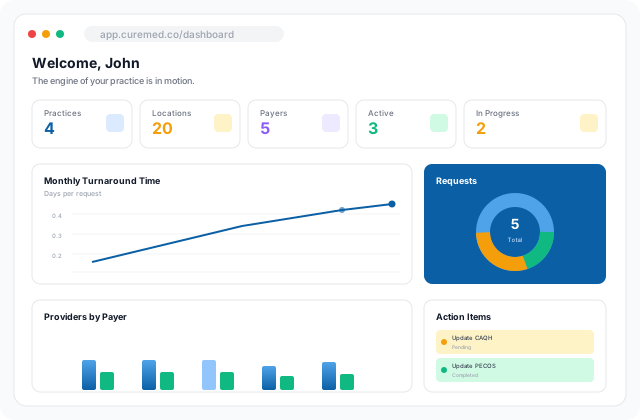
Executive dashboard with practice counters, monthly turnaround chart, request status breakdown and action items
01Feature 01 of 06

Executive Dashboard

The whole credentialing engine on one screen.

Total practices, total payers, active vs. in-progress payers, monthly turnaround, and the latest action items, all visible in one frame. The page leadership opens first thing on a Monday.

  • Practice, location & payer counters
  • Monthly turnaround chart
  • Request status breakdown
  • Location-vs-provider credentialing overview
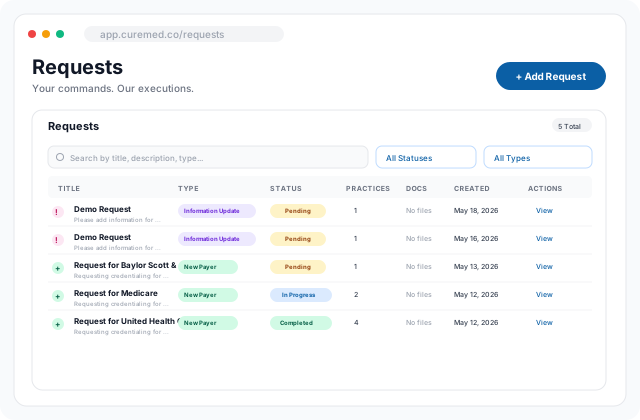
Requests table with type and status filters and a full comment thread
02Feature 02 of 06

Requests

Your commands; our executions.

Every credentialing action (new payer, information update, document refresh) is filed as a Request with a title, type, status, practices affected, and full comment thread. Tracked from initiator through completion, with sub-48-hour turnaround.

  • New payer, information update, document refresh types
  • Pending / In Progress / Completed status
  • Per-practice scoping & document attachments
  • Comment thread tied to original initiator
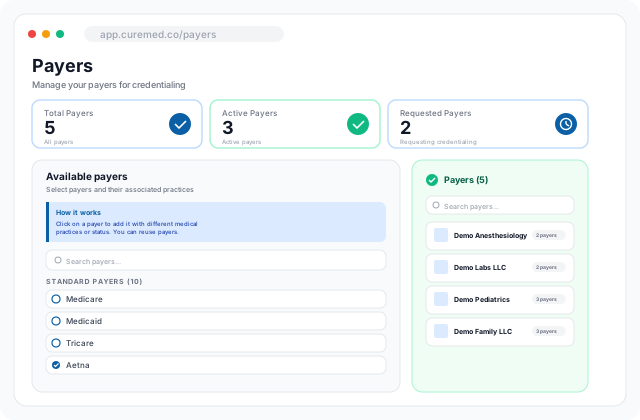
Payer management screen with standard payer library, custom payer addition and per-practice rollups
03Feature 03 of 06

Payer Management

Add standard or custom payers and assign them to medical practices.

A library of standard payers plus the ability to spin up custom ones. Each payer can be added against multiple practices with a status (Active or Requesting Credentialing) and reused across the organization.

  • Standard payer library + custom payer addition
  • Multi-practice assignment per payer
  • Active vs. Requesting Credentialing states
  • Per-practice payer rollups in the sidebar
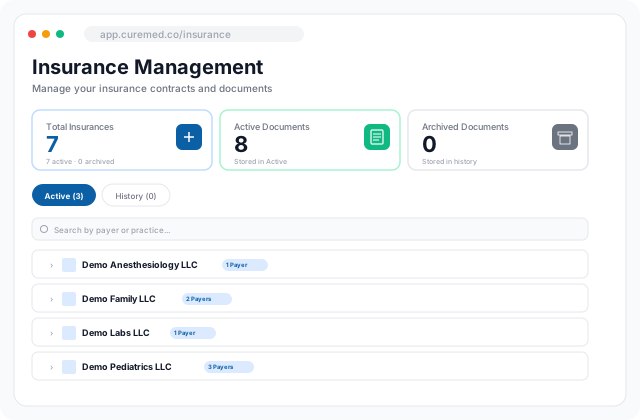
Insurance and document management view with active and archived states and expiry alerts
04Feature 04 of 06

Insurance & Document Management

Contracts and credentialing documents, organized by practice.

Every insurance contract and credentialing document, grouped by practice and payer. Active and archived states, expiry-date alerting, and full version history, so nothing important goes stale unnoticed.

  • Active and archived document states
  • Expiry-date alerts via email & in-app
  • Search by payer or practice
  • Per-practice payer counters
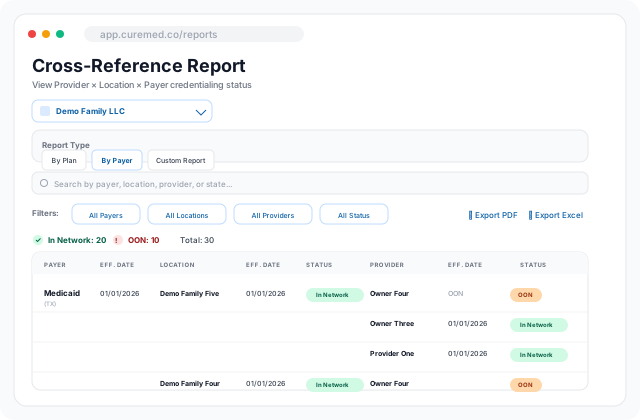
Cross-reference report with multi-filter row, in-network and OON counters and a payer-location-provider matrix
05Feature 05 of 06

Reporting

Provider × Location × Payer credentialing status, filtered any way you need it.

A cross-reference matrix of who is credentialed where, with which payer, and on which date. Filter by payer, location, provider, or status. Export to PDF or Excel in a click, with no waiting on the analytics team.

  • By Plan, By Payer, and Custom report types
  • Filters: payer, location, provider, status
  • In-Network vs. OON counters
  • One-click PDF and Excel export
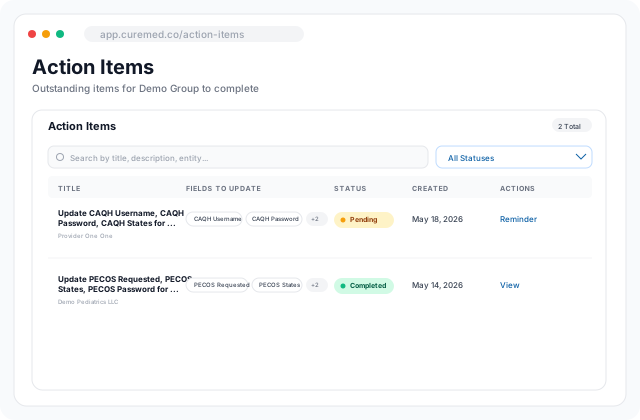
Action Items queue with field-level update prompts, status tracking and a reminder workflow
06Feature 06 of 06

Action Items

Outstanding items, streamlined and assigned.

Outstanding fields, missing usernames, pending CAQH or PECOS updates: surfaced as Action Items with a status, the exact fields needing update, and a reminder workflow. The front desk knows what to do next without a phone call.

  • Field-level update prompts
  • Pending vs. Completed status tracking
  • In-app reminder workflow
  • Searchable by title, description, entity, or field
Roles & access

Six roles, one workflow. Everyone sees exactly what they should.

Owners and Directors gate what the rest of the organization can see and do. New requests filter through approval, so nothing is loose.

Owner

Full org control. Approve or reject requests, manage visibility, view detailed logs on demand.

Owner & Provider

Owner permissions plus a provider profile and personal credentialing artifacts.

Provider

Personal credentialing view: own payers, documents, expiries, and action items.

Director

Multi-practice visibility and approvals. Same gating power as Owner across assigned practices.

Manager

Operations view across requests, payers, and reports. Cannot approve org-wide gating changes.

Front Desk / VMA

Read-only payer & plan status, action items, and the ability to file new requests.

Traditional vs CureMed

Credentialing has been a spreadsheet problem for too long.

Six recurring patterns we found in every practice we audited, and what the CureMed Credentialing App does instead.

Traditional credentialingCureMed Credentialing App
Traditional credentialing

Manual processes layered on email, spreadsheets and shared drives.

CureMed Credentialing App

One screen for every credentialing need, on any device.

Traditional credentialing

Hard to keep track of every payer's status across providers.

CureMed Credentialing App

Live payer and plan status, visible to the front desk and virtual assistants.

Traditional credentialing

Too many disconnected reports to shuffle between before a clear picture emerges.

CureMed Credentialing App

One-click live reports, with no waiting until end of month for a snapshot.

Traditional credentialing

Providers and admins repeatedly chase each other for the same updates.

CureMed Credentialing App

Every request is traceable back to the team member who initiated it.

Traditional credentialing

Document expirations tracked by hand across providers and payers.

CureMed Credentialing App

Automated email and in-app alerts, including for upcoming expiries.

Traditional credentialing

Manual coordination across coding, AR, front desk and leadership.

CureMed Credentialing App

Owner and Director gating on what each team member can see or do.

Choose your plan

Activate your organization to start credentialing. 10-day free trial on all plans, cancel anytime.

Tier 1

$200/mo

Solo practice: 1 provider, 1 location.

  • 1 practice
  • 1 provider
  • 1 location
  • 5 active requests
  • First year, then $100/mo account maintenance
  • 12-month contract
  • 10-day free trial, cancel anytime

Custom

Custompricing

Tailored plan for larger practices. Contact us.

  • Unlimited practices
  • Unlimited providers
  • Unlimited locations
  • Unlimited active requests
  • Dedicated implementation
  • Multi-site group support

All prices in USD. Card details are securely handled by Stripe.

Get started

Ready to put credentialing on autopilot?

Create your organization in minutes, invite your providers, and start submitting payer enrollments today. Your 10-day trial is free, and your Credentialing Specialist will be in touch within 24 hours.

Go to Portal